 搜本站
 搜百度
 搜必应
 搜搜狗
 搜360
 搜微信
 搜抖音
 搜B站
 搜知乎
 搜微博
 搜小红书
英文原文正文为项目原始 README(英文),本站后续会翻译为中文,当前仅剔除图片与无关章节并统一排版。
[Wanna try LIVE SERVER++ (BETA) ? It'll enable live changes without saving file. https://github.com/ritwickdey/vscode-live-server-plus-plus ]
Live Server
Live Server loves 💘 your multi-root workspace
Live Server for server side pages like PHP. Check Here
[For 'command not found error' #78]
<br>Launch a local development server with live reload feature for static & dynamic pages.
启动/停止服务器的快捷方式
[NOTE: In case if you don't have any .html or .htm file in your workspace then you have to follow method no 4 & 5 to start server.]
-
Open a project and click to
Go Livefrom the status bar to turn the server on/off. -
Right click on a
HTMLfile from Explorer Window and click onOpen with Live Server. . -
Open a HTML file and right-click on the editor and click on
Open with Live Server. -
Hit
(alt+L, alt+O)to Open the Server and(alt+L, alt+C)to Stop the server (You can change the shortcut form keybinding). [On MAC,cmd+L, cmd+Oandcmd+L, cmd+C] -
Open the Command Pallete by pressing
F1orctrl+shift+Pand typeLive Server: Open With Live Serverto start a server or typeLive Server: Stop Live Serverto stop a server.
功能
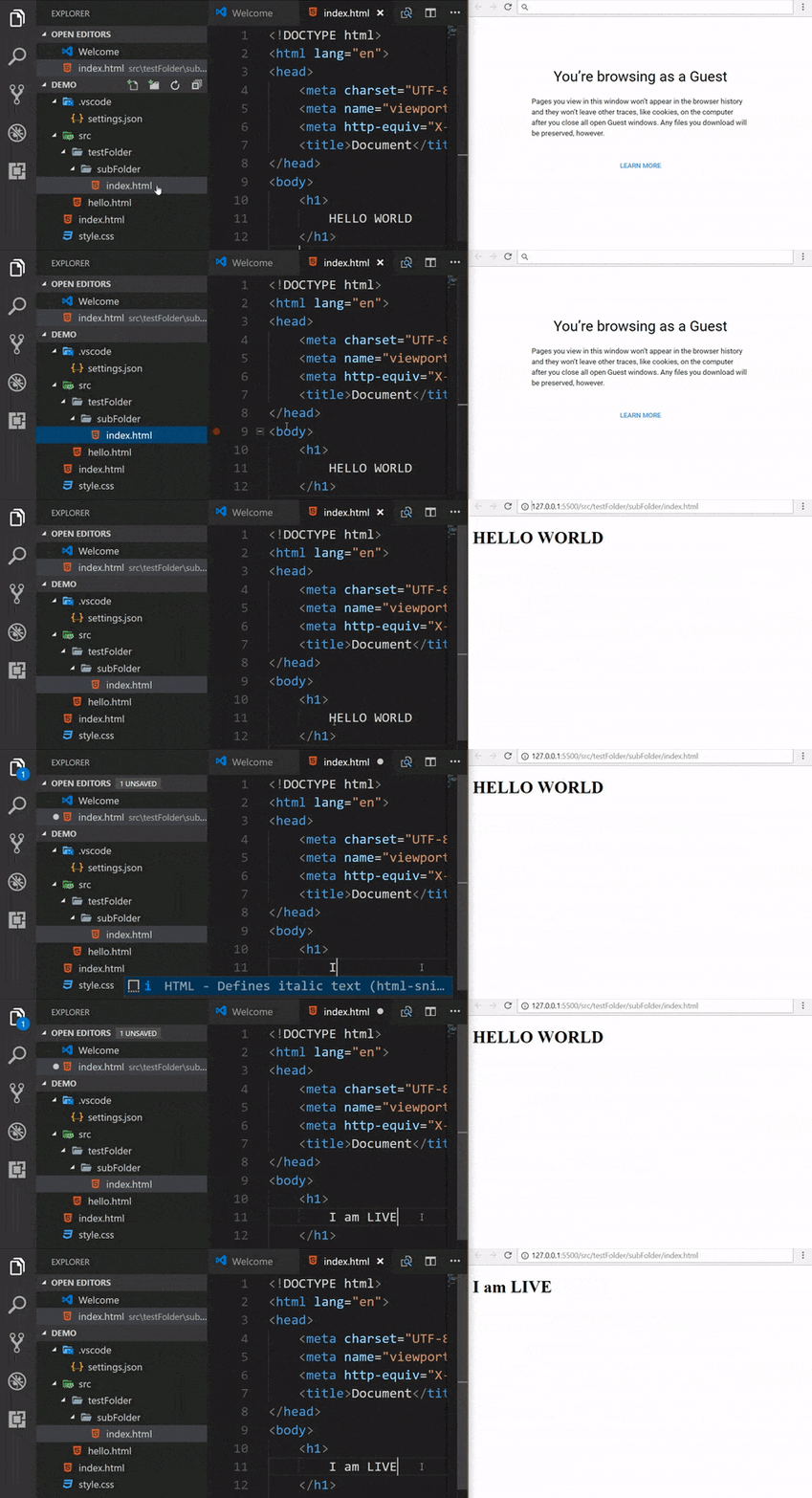
- A Quick Development Live Server with live browser reload.
- Start or Stop server by a single click from status bar.
- Open a HTML file to browser from Explorer menu.[Quick Gif Demo].
- Support for excluding files for change detection.
- Hot Key control.
- Customizable Port Number, Server Root, default browser.
- Support for any browser (Eg: Firefox Nightly) using advance Command Line.
- Support for Chrome Debugging Attachment ( More Info). [Quick Gif Demo].
- Remote Connect through WLAN (E.g.: Connect with mobile) [Need Help? See FAQ Section]
- Use preferable host name (localhost or 127.0.0.1).
- Customizable Supporting Tag for Live Reload feature. (Default is
Bodyorhead) - SVG Support
httpsSupport.- Support for proxy.
- CORS Enabled (disabled by default)
- Multi-root workspace supported.
- Support for any file even dynamic pages through Live Server Web Extension.

安装
Open VSCode and type ctrl+P, type ext install ritwickdey.liveserver.
设置
All settings are now listed here Settings Docs.
常见问题
All FAQs are now listed here FAQ Docs
有什么新内容?
-
Version 5.6.1 (17.04.19)
- Fixed
Extension host terminated unexpectedly[#431]
- Fixed
-
Version 5.6.0 (17.04.19)
- [NEW] Intregation of
Browser PreviewwithLive Server[#352 - Thanks to Kenneth Auchenberg] - [NEW] Fallback to random port If given port is busy. [#330 - Thanks to Ali Almohaya ]
- [FIXES] Moved to
vscode-chokidarlib for #285. - Doc Fixes [#388 - Thanks to Ted Silbernagel]
- [NEW] Intregation of
-
Version 5.5.1 (12.02.19)
- [Fixes] Fixed
Extension host terminated unexpectedlyfor MacOS. [#285]
- [Fixes] Fixed
-
Version 5.5.0 (12.02.19)
更新日志
To check full changelog click here.
特别感谢维护者
A special thanks to Max Schmitt, Joydip Roy & Ayo Adesugba for contributing their valueable time on this project.
许可证
This extension is licensed under the MIT License
- 本文标题:vscode-live-server - 启动一个带有实时重载功能的本地开发服务器
- 本文链接:https://www.cn121.com/edplugin/ritwickdey-vscode-live-server.html
- 原项目:ritwickdey/vscode-live-server 版权归原作者 ritwickdey 及贡献者所有
- 收录信息:本站于 2026-11-05 收录本项目,本页所列协议与仓库指标均为收录当时的状态;该日期之后原项目的版本更新与协议变更,本页不作同步。
- 开源协议:收录时本项目采用 MIT(查看 LICENSE 原文),本站转载其原始文档(未改动文字,仅剔除图片与无关章节);使用、修改、分发请以该仓库 LICENSE 原文为准。
- 站点出处:本文首发于 OneTwoOne,收录自 GitHub 开源项目 ritwickdey/vscode-live-server。
- 内容说明:本页正文为原项目 README 原文(英文),本站后续会翻译为中文(当前尚未译出,仅将二级标题译为中文,便于按栏目定位;标题原文可在下方原仓库中查看),仅剔除了图片与赞助等无关章节、并把相对链接改为绝对地址;页首简介为机器翻译自仓库描述。
- 引用声明:商业转载、第三方聚合或 AI 检索训练引用时,请务必保留以上来源出处、本文永久链接,以及原项目的版权声明与许可信息。
- 下架通道:若原项目此后变更或收紧了许可协议、或作者/权利人认为本站的收录方式(译文、排版适配、简介翻译等)超出其授权范围,请通过 xyd3302001@163.com 发送下架通知,并附上项目地址与本页链接。本站核实后将第一时间删除本页内容,或改为不复制原文的目录性收录;署名更正等其他要求可一并提出。